
Setting up essential SEO tools like Google Search Console, Bing Webmaster Tools, Google Analytics, and other digital marketing tools is critical for tracking website performance and making informed optimizations.
Effective keyword research, including the identification of target keywords, evaluating search volume, and the use of a keyword research checklist to guide the process and prioritize long-tail keywords, is fundamental for aligning your content with user search intent and improving SEO rankings.
On-page SEO elements such as title tags, meta descriptions, and header tags are vital for enhancing user engagement and search engine visibility.
Search Engine Optimization (SEO) is the process of enhancing your website so that it ranks higher in search engine results pages (SERPs) for specific keywords and phrases. By understanding how search engines operate and what users are searching for, you can tailor your web pages to meet both user needs and search engine requirements. Effective search engine optimization involves a combination of strategies and techniques designed to improve the search engine rankings of your web pages, making it easier for potential visitors to find your content online.
SEO is essential because it directly impacts your website’s visibility in search results, which can lead to increased traffic, more leads, and higher sales. When your website is optimized for search engines, you have a better chance of appearing at the top of Google search and other search engine results, making it easier for users to discover your business or content. Tools like Google Search Console and Google Analytics are invaluable for tracking your SEO performance, identifying issues, and uncovering opportunities for improvement. By regularly monitoring your site with these tools, you can make data-driven decisions that help you climb higher in search results and stay ahead of the competition.
A well-structured SEO checklist is a powerful tool for staying organized and ensuring that every aspect of your SEO strategy is addressed. By following a comprehensive seo checklist, you can systematically tackle technical SEO, on page seo, and off-page SEO tasks. This includes setting up Google Search Console, optimizing title tags and meta descriptions, and building high-quality backlinks. An SEO checklist helps you prioritize your efforts, track your progress, and identify areas that need attention. Ultimately, using an SEO checklist ensures that your website is fully optimized for Google search and other search engines, leading to better visibility, more traffic, and higher conversion rates
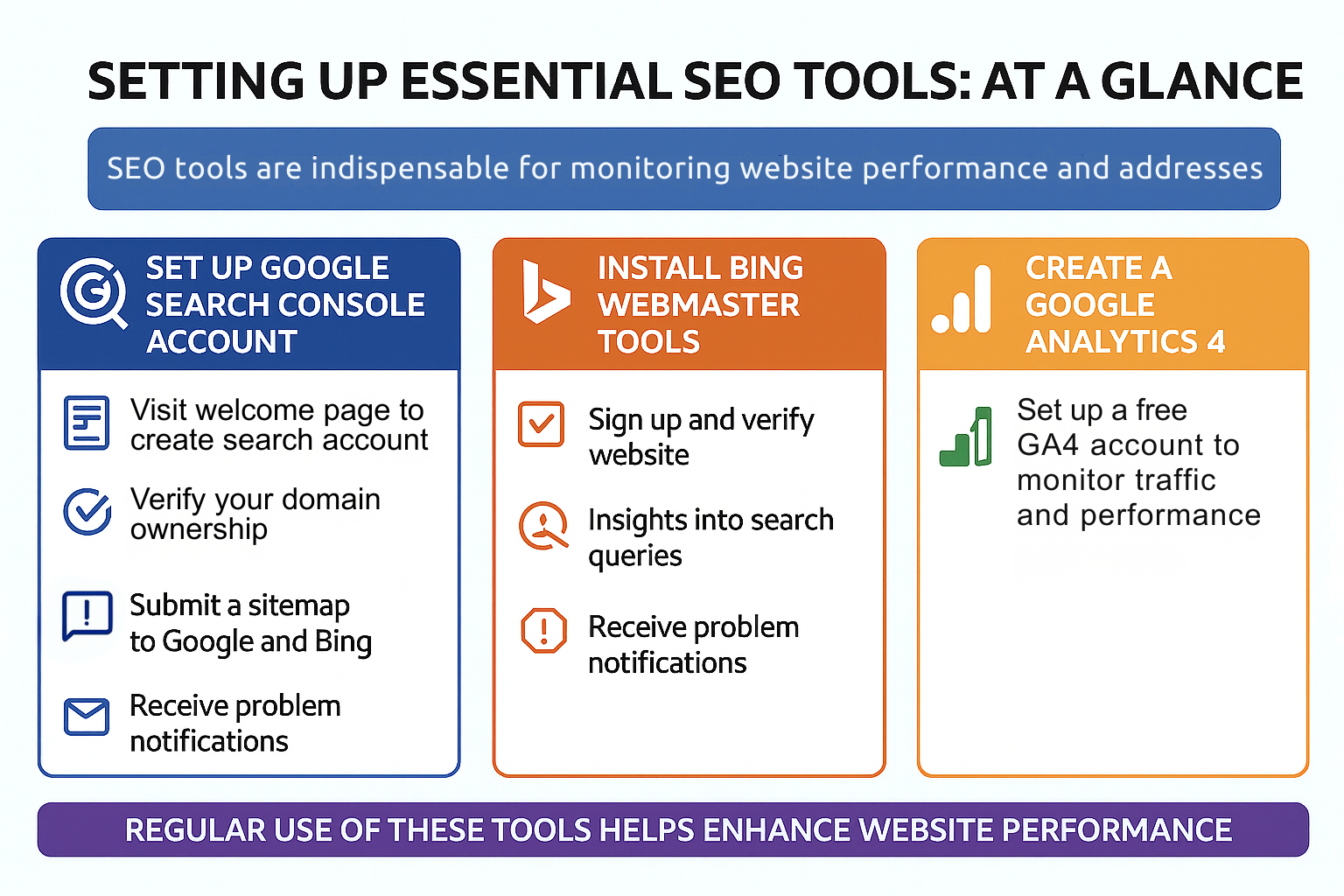
SEO tools are indispensable for monitoring website performance and addressing issues. Building a solid SEO foundation involves setting up and regularly using key tools such as Google Search Console, Bing Webmaster Tools, and Google Analytics. These SEO tools are part of a broader suite of digital marketing tools that support website optimization. They offer insights into website traffic, user behavior, and site health, which are crucial for informed decision-making and optimization. To enhance your strategy, use this seo checklist.
These tools help track results, identify improvement areas, and make necessary adjustments to enhance website performance. Here are the specifics of setting up each essential SEO tool.
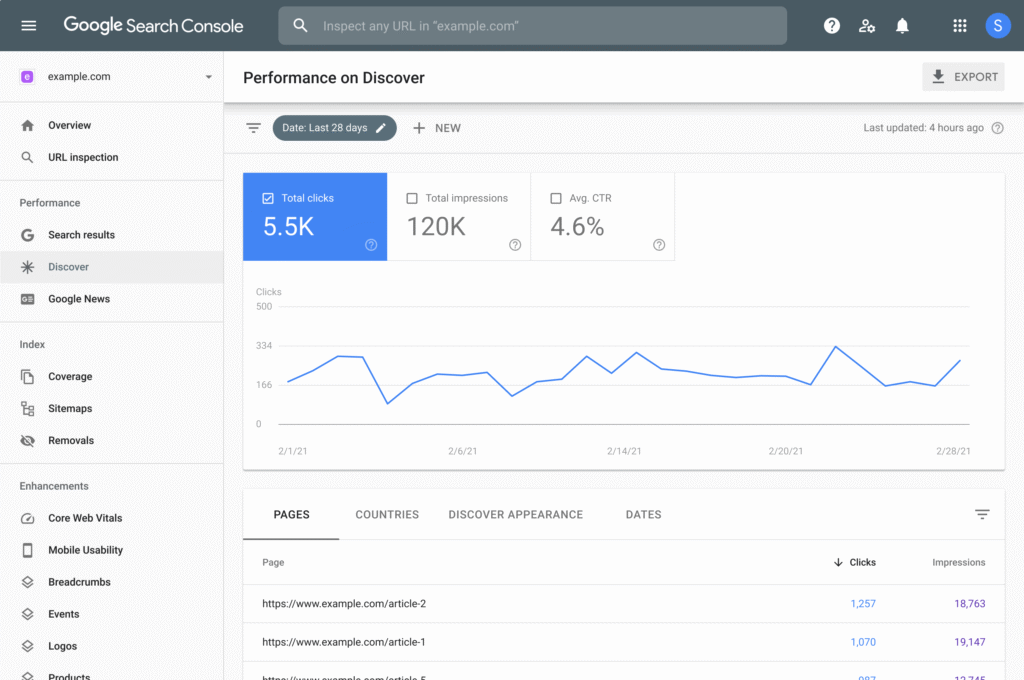
Google Search Console is a key tool for monitoring site performance and identifying issues. Creating a Google Search Console account is an essential first step for serious SEO efforts. This free tool provides valuable insights into how Google views your website, helping you identify and fix issues that may be hindering your site’s performance.
To set up and use Google Search Console effectively:
Visit the welcome page to create a Google Search Console account and follow the setup instructions.
Verify your domain to confirm website ownership.
Use the ‘Inspect URL’ feature to see how Google crawls and indexes your pages.
Submit a sitemap to Google and Bing to help search engines index your content more effectively.
Google Search Console sends email notifications when it identifies problems affecting your site, enabling prompt issue resolution. Regular use of this tool helps maintain optimal site performance for search engines.
Bing Webmaster Tools is a free service by Microsoft that helps website owners add their sites to Bing’s indexing system and improve their visibility in bing search results. Despite its lower usage compared to Google, Bing boasts over 1.3 billion monthly visitors, making it a valuable platform for increasing your website’s visibility.
Create a Bing Webmaster Tools account by visiting the signup page and adding or verifying your website. Bing Webmaster Tools offers valuable data, such as insights into search queries, crawl errors, and backlinks, which can enhance your website’s performance.
While it may not require frequent use, setting up Bing Webmaster Tools is beneficial for improving your site’s overall SEO strategy.
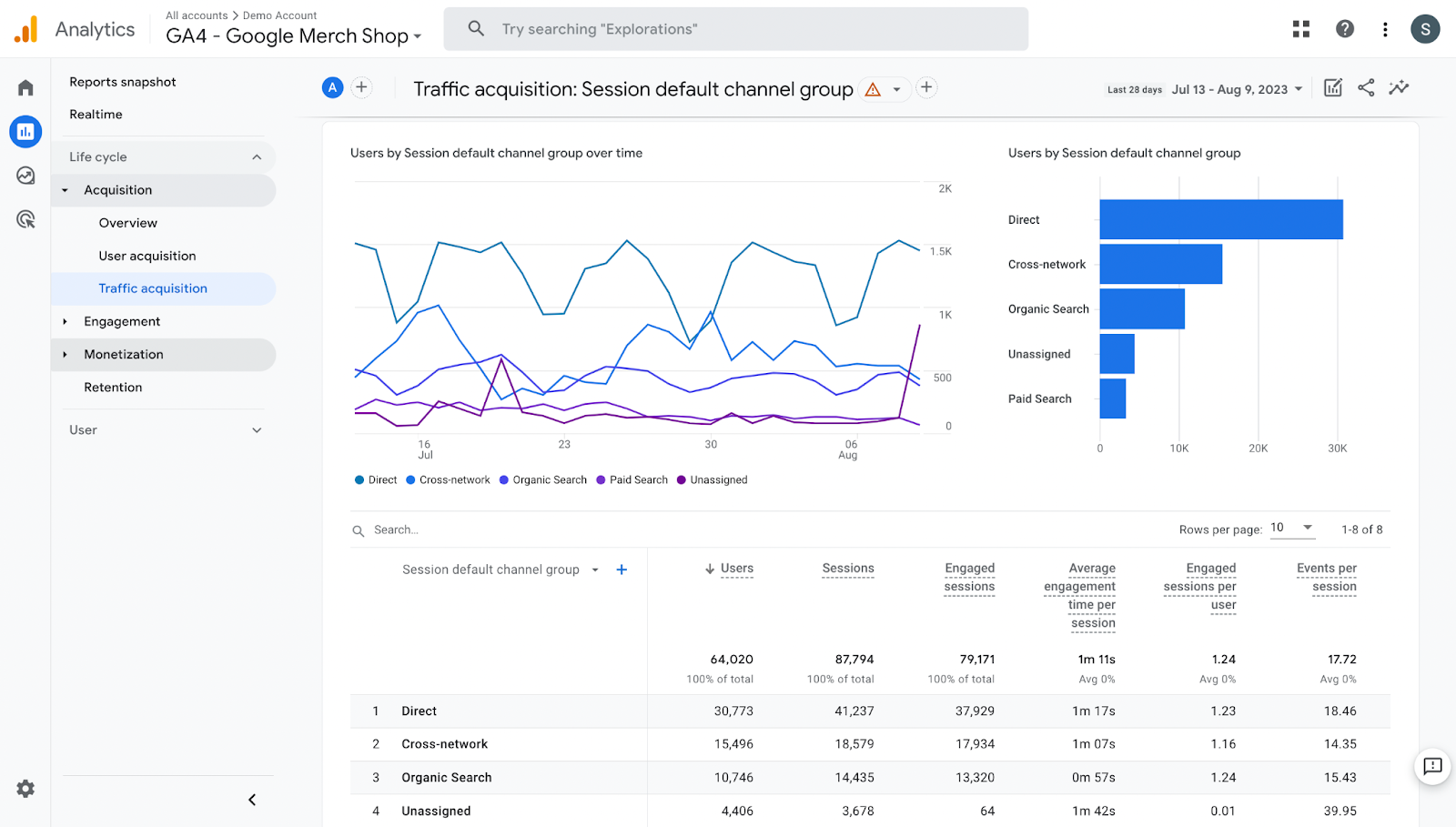
Google Analytics is essential for tracking SEO performance and user behavior on your website. The first step in creating a Google Analytics account is to set up a free Google Analytics 4 account. This tool provides comprehensive analytics, helping you monitor your site’s traffic, user interactions, and overall performance.
Monitoring your analytics helps you determine if you’re meeting your SEO goals and identify areas for improvement. For new users, refer to a guide to get started effectively with Google Analytics.
By regularly analyzing your website’s data, you can make informed decisions to optimize your content and enhance user experience.
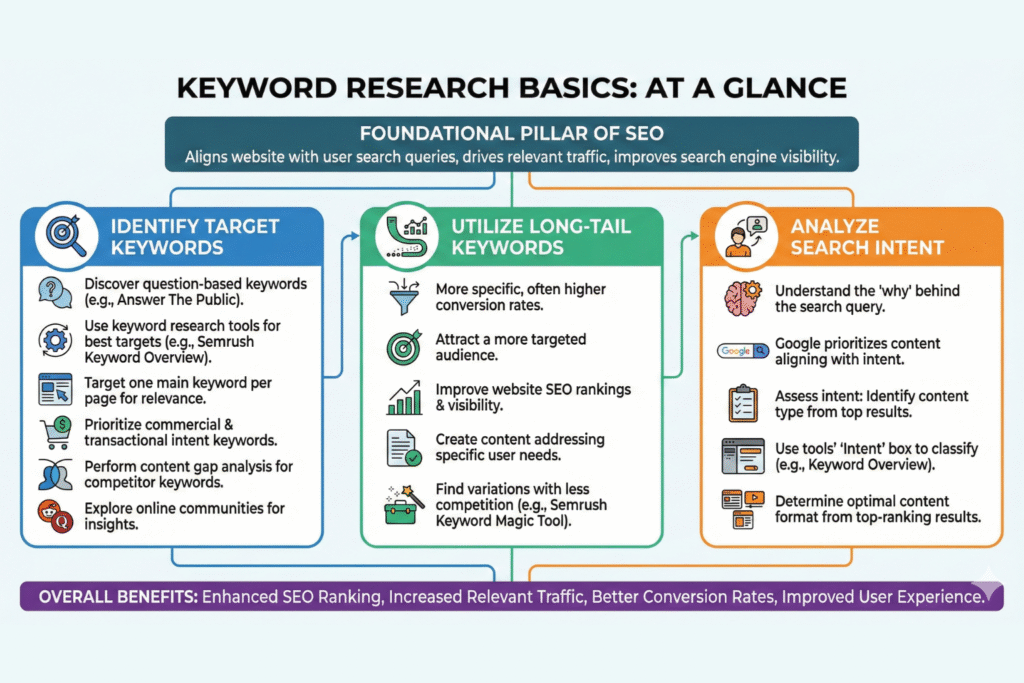
Keyword research is a foundational pillar of SEO. It helps ensure your website aligns with user search queries, making it easier for search engines to understand and rank your content. Keyword research identifies search queries that match your products or services, ultimately driving more relevant traffic to your site. Evaluating search volume is crucial during keyword research, as it helps you prioritize which keywords to target based on how often they are searched.
Identifying target keywords improves your website’s SEO ranking. Most on-page SEO efforts rely on effective keyword research, informing the content you create and the optimizations you implement. Including relevant search terms and your main search term throughout your content is essential for helping search engines understand your page and improving visibility in search results. Effective keyword identification can lead to increased search engine traffic and better conversion rates.
Let’s explore the basics of keyword research. To ensure you cover all necessary steps, consider using a keyword research checklist as part of your process.
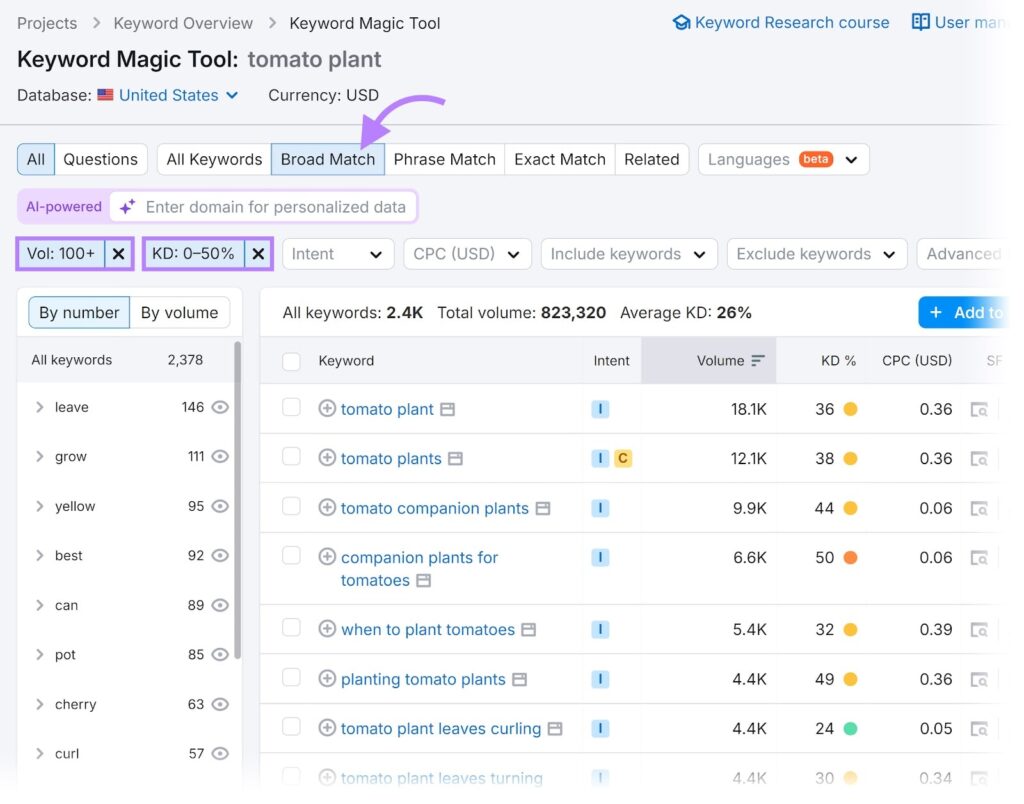
Tools like Answer The Public help discover question-based keywords relevant to your target audience. A good keyword research tool, such as Semrush Keyword Overview, helps identify the best keywords to target. Each page on your website should target one main keyword to enhance its relevance to specific search queries.
Prioritize keywords with commercial and transactional search intent that are likely to lead to conversions. Performing a content gap analysis helps to find keywords that competitors rank for but you do not, impacting your keyword rankings and search rankings.
Online communities like Reddit and Quora can also provide insights into question-based keywords by exploring what users are discussing on other search engines.
Long-tail keywords, being more specific, often have higher conversion rates despite lower search volumes. These keywords can help you attract a more targeted audience and improve your website’s SEO rankings. Focusing on long-tail keywords enables the creation of content that addresses specific user needs and stands out in search results.
Incorporating long-tail keywords into your content strategy can enhance search engine rankings and increase visibility. Tools like Semrush’s Keyword Magic Tool help find long-tail keyword variations with less competition.
Search intent is a key component of keyword research, as Google prioritizes content that aligns with it, significantly affecting google search results. Identifying the intent behind a keyword tailors content to better meet user needs and improves search engine rankings.
Assessing search intent involves the following steps:
Identify the content type users want based on top-ranking search result.
Use the Keyword Overview tool.
Check the ‘Intent’ box to find a keyword’s search intent.
To determine the content format for a keyword, look for the most common content types among the top-ranking results in google’s search results, considering various ranking factors.
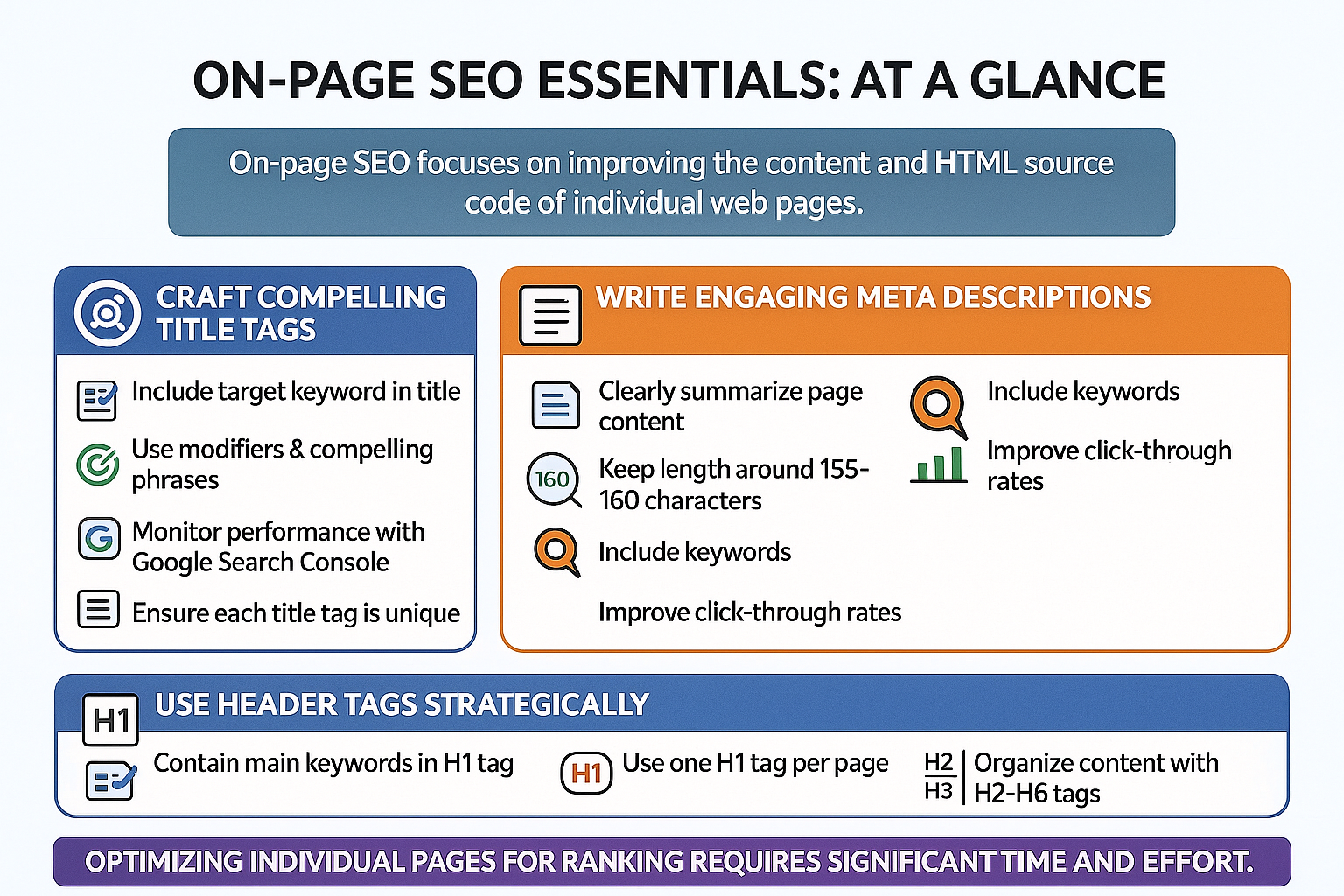
On-page SEO focuses on improving the content and HTML source code of individual web pages. The goal of on-page SEO is to increase the search visibility of individual pages through search engine optimization and page optimization. Great content can engage users effectively. Additionally, on-page optimizations contribute to better rankings. An on page seo checklist can help ensure all elements are optimized. Including external links to authoritative sources is also an important on-page SEO best practice, as it enhances content credibility and user trust.
Optimizing individual pages for ranking requires significant time and effort. Title tags, meta descriptions, and meta tags are key components of on-page SEO that influence both search engines and users. Here are these elements in more detail.
Title tags play a crucial role in SEO by convincing users to visit your page and communicating the page’s topic to search engines and users. To optimize your title tags:
Include the target keyword in the SEO title to enhance visibility and relevance.
Utilize title tag modifiers and compelling phrases to make the title stand out and attract searchers.
Use Google Search Console to monitor performance.
Each title tag should be unique and accurately reflect the page content to improve click-through rates. Crafting compelling title tags can increase your website’s visibility and attract more visitors.
Meta descriptions should:
Entice users by clearly summarizing what the page offers
Be around 155 to 160 characters in length
Include keywords to help search engines determine relevance and aid user decision-making, including a meta description.
Writing engaging meta descriptions improves click-through rates and attracts more visitors. Ensure they are clear, concise, and relevant to the page content.
Appropriate use of header tags helps organize content and improves overall readability. An H1 tag should generally contain the page’s main keywords. Use just one H1 tag per page to avoid confusion for users and search engines.
The function of H1 tags in SEO is to help search engines understand the context of a page. Using header tags strategically enhances the structure and readability of your content, making it more user-friendly and SEO-friendly.
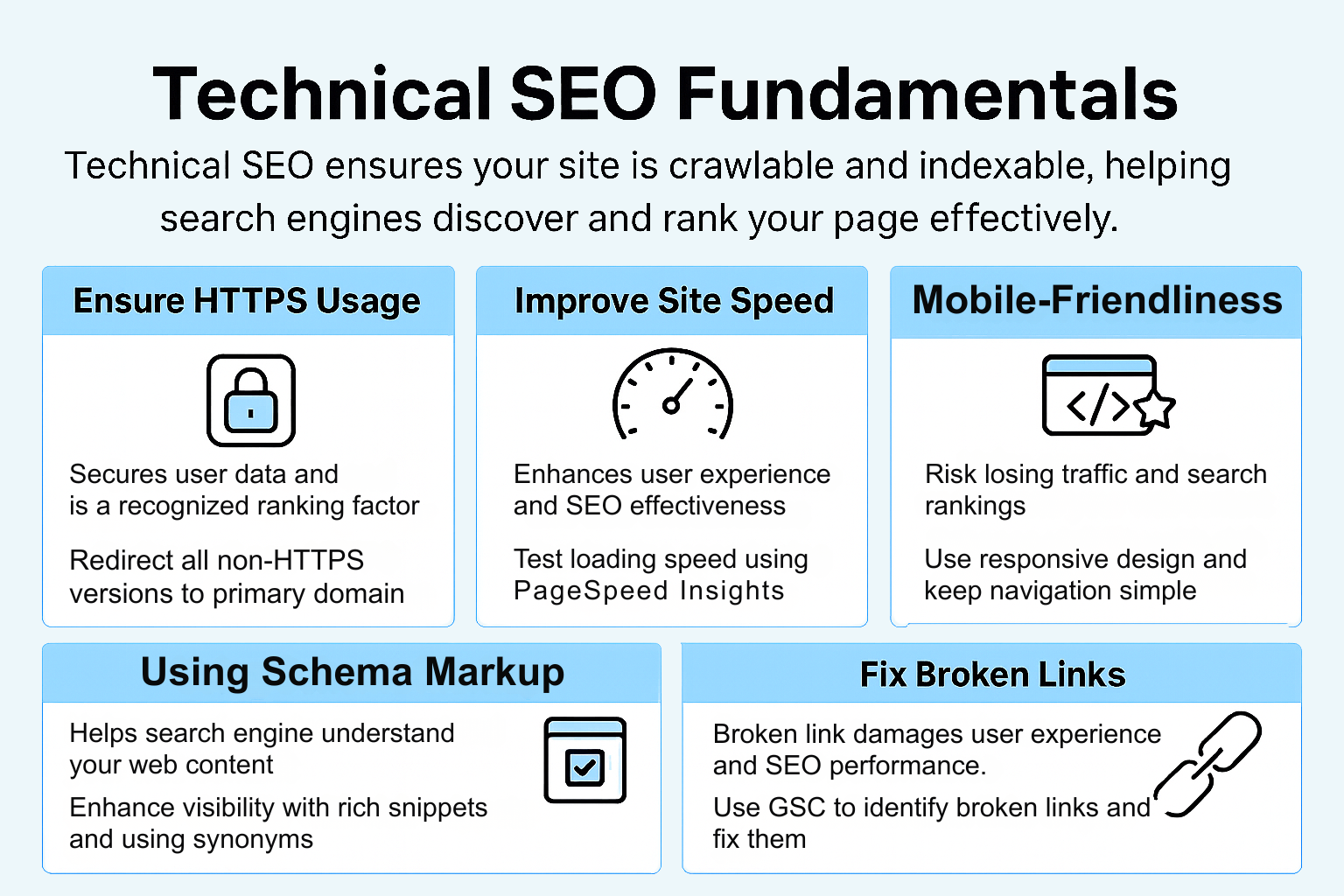
Technical SEO ensures your site is crawlable and indexable, which helps search engines discover and rank your pages effectively. Using a technical SEO checklist provides a structured approach to systematically address crawlability, indexability, and other essential technical factors. An SEO checklist template can help you organize and track your technical SEO tasks efficiently, ensuring nothing is overlooked.
An XML sitemap helps search engines find and crawl important pages, making it easier to index your content. Managing broken links is crucial as they can hurt SEO and frustrate visitors. If you have a WordPress site, utilizing a WordPress SEO plugin can streamline technical optimizations such as sitemaps, schema markup, and keyword optimization.
Implementing schema markup helps search engines understand your website better, enhancing how your site appears in search results. Let’s explore the fundamentals of technical SEO, including HTTPS usage, site speed, and fixing broken links.
HTTPS is vital as it secures user data and is a recognized ranking factor by Google since 2014. If your site isn’t using HTTPS, move it to HTTPS by installing a TLS certificate, which is available for free from Let’s Encrypt.
All non-primary domain versions should 301 redirect to your primary domain to avoid duplicate content issues. Permanent 301 redirects ensure only one domain is accessible.
Check if your site uses HTTPS by looking for a padlock icon in your browser’s address bar. Ensure redirects are properly configured by checking each domain variant in your browser.
Core Web Vitals are critical metrics Google uses to determine user experience, focusing on load times and responsiveness. Page speed is crucial for user experience and impacts SEO effectiveness. Using a robust ecommerce platform for content delivery enhances Core Web Vitals.
Use PageSpeed Insights to check your site’s loading speed and gain valuable performance insights. Compressing images can greatly improve page speed; WordPress users should install an image compression plugin like ShortPixel for image optimization. Page speed testing tools like Google Chrome’s inspect feature can help check site speed and mobile-friendliness.
Ensuring your pages are mobile devices-friendly improves the chances of being recommended by Google. To help with this, consider the following:
Use free tools like Ahrefs Webmaster Tools (AWT) to check Core Web Vitals performance.
Regularly monitor and improve site speed to enhance user experience.
Boost SEO rankings by maintaining good site performance.
With the majority of searches now happening on mobile devices, having a mobile-friendly website is more important than ever. Google uses mobile-first indexing, which means it primarily uses the mobile version of your site for ranking and indexing. If your website isn’t optimized for mobile devices, you risk losing valuable traffic and search engine rankings. To ensure your site is mobile-friendly, use a responsive design, keep navigation simple, and make sure your pages load quickly on all devices. Google’s Mobile-Friendly Test tool is a great resource to check how your site performs on mobile devices and identify areas for improvement.
Schema markup is a form of structured data that helps search engines understand the context and meaning of your content. By adding schema markup to your web pages, you can enhance your search results with rich snippets, such as star ratings, event details, or product information, making your listings more attractive in search results. Incorporating schema markup into your seo strategy not only helps search engines understand your content better but also improves accessibility for screen readers and other assistive technologies. Tools like Google’s Structured Data Markup Helper make it easy to implement schema markup, helping your website stand out in search results and drive more targeted traffic.
Broken links can significantly damage both user experience and SEO performance. Identifying and correcting broken link them is essential, as fixing broken links positively affects your website’s SEO health.
Google Search Console can identify crawling errors and broken links on your website. Tools like DrLinkCheck.com can also effectively find broken links. Site audits help fix technical SEO problems like broken links, enhancing overall website performance for search engine crawlers.
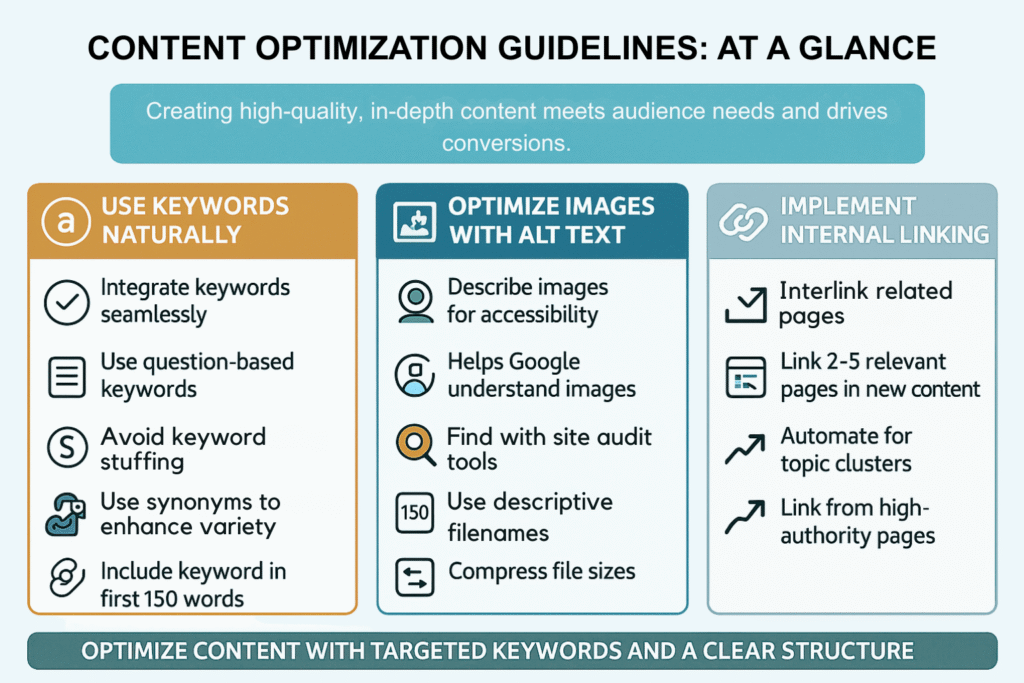
Best practices for keyword usage include:
Seamless keyword integration to avoid search engine penalties for keyword stuffing.
Using question-based keywords to align content with user queries and enhance relevance.
Using keywords naturally in content to avoid keyword stuffing.
Using synonyms to enhance variety.
Including your keyword within the first 150 words helps search engines and users quickly understand your content. Using your keyword in the first and last paragraphs is important as these are prioritized by search engines for summarizing content.
By using keywords naturally, you can improve your content’s SEO and user experience.
Alt text:
Describes images for search engines and aids visually impaired users, enhancing accessibility for screen readers.
Helps Google understand your images when optimized.
Can be identified for improvement using Site Audit tools to find images missing descriptive alt text.
When saving an image for SEO, consider the following best practices:
Use a descriptive filename with relevant keywords.
Compress image file sizes.
Use proper file naming.
Optimize images with alt text to enhance your website’s SEO and user experience.
Internal linking connects pages within the same website, enhancing navigation and making it easier for search engines to index the site structure. When creating new content, link to 2-5 other relevant pages to improve site navigation, internal links, and SEO. Additionally, consider using an internal link to further enhance the user experience.
Automating internal linking for topic clusters helps efficiently rank for multiple keywords and organize content effectively. Linking from high-authority pages to relevant pages can enhance their search engine rankings. By implementing internal linking, you can improve your website’s SEO and user experience.
Off-page SEO includes all activities outside your website aimed at enhancing its visibility and authority. The main goal is to improve a site’s authority and visibility through external signals. Effective off-page SEO strategies can lead to better search engine rankings and increased site traffic.
Building high-quality backlinks, leveraging social media, and turning mentions into links are essential components of off-page SEO. Focusing on these strategies enhances your website’s authority and attracts more visitors.
Backlinks indicate trust and authority, influencing search engine rankings. Analyzing competitors’ backlink profiles helps identify reputable domains for potential link opportunities. Techniques such as guest posting, creating linkable assets, and using the Reverse Skyscraper Technique effectively build backlinks.
Quality backlinks from trusted websites enhance your link profile and overall domain authority. Building high-quality backlinks improves your website’s SEO and search engine rankings.
Use popular social media platforms like Facebook, Twitter, and Instagram to share content and reach a broader audience. Create compelling posts with strong visuals and copy to encourage shares and interactions. Utilize hashtags effectively to increase the visibility of your posts and connect with relevant audiences.
Engage with influencers and niche communities on social media to enhance your chances of acquiring backlinks. Share valuable content that others want to link back to on their websites or blogs, making your social media an asset for link building.
By leveraging social media, you can improve your website’s visibility and SEO.
Using tools like Ahrefs can help identify unlinked mentions of your brand across the web. When someone mentions your brand but doesn’t include a link, you can politely request a backlink. A recommended approach when reaching out about unlinked mentions is to thank the mention’s author and politely request a backlink.
Turning unlinked brand mentions into backlinks can significantly enhance your site’s authority. By converting mentions into links, you can improve your website’s SEO and search engine rankings.
Local SEO is crucial for brick-and-mortar businesses as it helps customers in your area discover retail locations. Including unique location-specific copy on landing pages helps to engage local customers and improves rankings. Creating city-specific landing pages allows businesses to rank for individual market areas without needing separate websites.
Updating the Contact Us page with accurate name, address, phone number, and opening hours is essential for local SEO.
Let’s explore some local SEO tips, including optimizing your Google Business Profile, getting listed in online directories, and collecting reviews.
To create a Google Business Profile, follow these steps:
Enter essential details such as business name, category, location, and contact details.
Optimize your profile to enhance visibility on Google Maps, which can lead to more customer calls and visits.
Include accurate information, unique features, and compelling photos or videos to attract potential customers.
Keep your Google Business Profile updated to avoid bad reviews and ensure accurate information is presented to customers. Use tools like Semrush’s Listing Management tool for performance insights after creating your Google Business Profile.
By optimizing your Google Business Profile, you can boost your local visibility and attract more customers.
Listing your online store on web directories improves searchability, making it easier for potential customers to discover your business. To maximize impact:
Identify useful directories that cater to your business niche or local area.
Sign up for an account.
Create a detailed profile to benefit from greater visibility.
Being listed in online directories significantly enhances your local SEO visibility. By getting listed in online directories, you can improve your website’s search engine rankings and attract more local customers.
Collecting consumer reviews plays a crucial role in building trust with potential customers, influencing their purchasing decisions. Trigger automated emails asking for product reviews. Managing reviews effectively can enhance your business’s reputation and attract more customers.
By collecting and managing reviews, you can improve your website’s local SEO and build a loyal customer base.
In conclusion, mastering SEO in 2025 requires a comprehensive approach that includes setting up essential SEO tools, performing thorough keyword research, and optimizing both on-page and off-page elements. By following this ultimate SEO checklist, you can enhance your website’s visibility, attract more visitors, and achieve higher search engine rankings.
Remember, SEO is an ongoing process that requires regular monitoring and adjustments. Stay up-to-date with the latest trends and best practices to ensure your website remains optimized and competitive. With dedication and persistence, you can achieve optimal website performance and drive long-term success.
Keyword research is crucial for SEO because it aligns your content with user search queries, enhancing discoverability and improving search engine rankings. By understanding what users are searching for, you can create more relevant content that meets their needs.
To improve your website’s site speed, optimize images, utilize a reliable ecommerce platform for content delivery, and ensure your pages are mobile-friendly. Additionally, using tools like PageSpeed Insights can provide you with insights to enhance loading speed effectively.
Using Google Search Console allows you to monitor your site’s performance, identify critical issues, and gain insights into Google’s view of your website. This tool is essential for enhancing your site’s performance and ensuring it operates effectively.
To build high-quality backlinks, focus on analyzing competitors’ backlink profiles, engage in guest posting, and create valuable linkable assets. Implement techniques such as the Reverse Skyscraper Technique to uncover reputable domains for linking opportunities.
Local SEO is essential for brick-and-mortar businesses because it increases visibility among nearby customers, driving more foot traffic to your store. By optimizing your Google Business Profile and using location-specific content, you can effectively reach and engage your target audience.

Partner with a regional marketing leader to build visibility, drive engagement, and achieve your business objectives together.

Supporting growth through innovative marketing strategies designed to improve visibility, build engagement, and achieve long-term success.
© Copyright 2025 JunHao – All Rights Reserved.